Starting a blog is overwhelming to say the least! When I started, my head was spinning. I questioned if I could handle it all or if I was even selecting the right resources to start?
So over the months, I put together a list of those resources I have continued to use and wanted to share them with you too! All of these resources have FREE options and of course, options to upgrade for a fee if it’s for you!
If you have any questions or input on the following, please send me an email! I’d love to help!
Get your FREE Media Kit Template!
*I may receive a small commission if you purchase some of the resources below. You can read more about my disclosure here.

Where To Start?
Host & Domain Name: HostGator
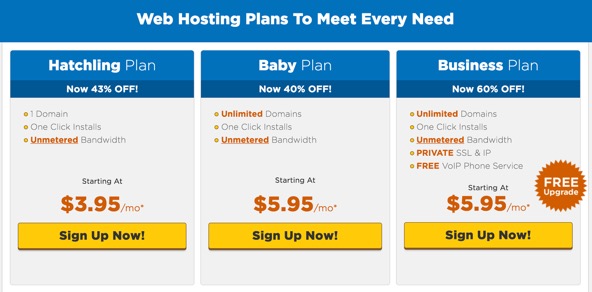
You cannot start a blog without a host AND a domain name. There are a TON of sites out there so this can get very overwhelming. Should you use a separate site to obtain your domain? If you’re new to the blogging game, I recommend using one site to set up both and allow that site to take care of everything for you. I pay just about $9.00 a month for both using HostGator. The “Hatchling Plan” is the basic hosting plan that is perfect for starting off your blog! Click here to start searching for a domain name now!
**HostGator is offering 61% off of hosting plans until the end of July 2018! Get it now!!
Blogging Platform: WordPress
 There are ALSO a lot of different platforms out there. Some easier to navigate than others. I am pretty comfortable with technology but I don’t know everything. With that said, I chose to use WordPress and LOVE how easy it is to use! It can get overwhelming if you want your site to be ultra fancy but starting off does not require much skill. My favorite part is that there is tons of help available! If I had a problem I had no idea how to fix, I would Google the issue and find an answer from either WordPress themselves or another WordPress user who had the same issue. Plugins come with and you can utilize them from within the platform to help make your blog even more awesome!
Theme: Juliet
The theme I chose is Juliet. It is a free theme by lyrathemes that is clean and easy to navigate. What made me choose it was the overall layout. I wanted lots of images! I also was very particular with my front (home) page. You can see a preview of this theme by clicking the link above. Take a look and see! This is a matter of preference and aesthetics so choose what theme works for YOU!
**My “Go-To” Blogging Resource!!! Food Blogger Pro
 Guys…I cannot say enough good things about this site! Food Blogger Pro is a blog that I came across while contemplating starting a blog. They have a podcast that made me so confident and very excited to start! I began listening to the podcasts for free and could not stop for MONTHS. I listened while I worked out and drove to work every day. Bjork’s wife built one of the largest food blogs out there called Pinch of Yum so he naturally knows a lot about the blogging world. The focus is a lot on food but even if you aren’t a food blogger, the information he gives you will be beneficial I promise! From SEO to photography, he covers it all! If you decide to become a member, it is $29.00 a month and you will get access to everything including their community forum where you can collaborate with other bloggers. I became a member as soon as enrollment opened! If you’re interested in a membership, I recommend signing up now to be put on the waiting list. They re-open enrollment a few times a year so you’ll want to be notified! Try it out for a month and see how you like it. You can opt out at any time if its not for you but I bet you wont!
They offer a free eBook called, “10 Mistakes that Bloggers Make and How to Fix Them”. Take a read!
Social Media Resources
Pinterest & Instagram Scheduler: Tailwind
Time is money. So if you use Pinterest, I highly recommend choosing a scheduling program like Tailwind so you stop wasting time worrying about pinning every day. Pinterest is a site that requires lots of pins and repins in order to get the kind of exposure you will want. In order to do this, you need to pin A LOT and throughout the course day too. I normally can pin a lot, so that was no big deal but the pinning throughout the day? Who has time for that?? Trust me, it will give you peace of mind allowing you to schedule your pins WEEKS or even MONTHS ahead of time. It pays for itself in time, I promise.
Instagram App: Followers
This is available through your app store for free. If you are big into Instagram, I recommend downloading it. It allows you to keep track of who your new followers are and who is not following you back as well as who you are not following back. It can inform you which users have blocked you and shows you a follower growth chart. It is easy to use and like I said, free so why not stay up-to-date on these analytics?!
Facebook Group Boards: New Blogger Support Group
Facebook can be a huge traffic source for you in addition to an information goldmine! If you are not a part of any groups yet, do it ASAP! There are a TON of Facebook groups out there. Depending what your niche is, will obviously depend on the group you join. I am not huge into Facebook but this group is awesome for information and resources. If you are an aspiring food blogger, this group is my go-to! Tip* Don’t join too many groups too early.
Images
Editing: PicMonkey
PicMonkey has been my favorite photo editor from the start! They have a free version and a paid version. The free version is great but has some limitations. I used the free version for a few months before upgrading to the paid which is about $5.99-$7.99 a month. Both will allow you to create beautiful photos, logos, social media graphics, facebook and Pinterest covers! I use it to create ALL of Pinterest images because it has an easy LONG pin template you can edit which are the type of pins you need! I also have used it to do some photo editing if I need a small change. Click the photo to the right to try it out!!
Editing: Adobe Photoshop Lightroom CC
This is my main GO-TO editing resource. It is an editing program that allows you to do so much with your photos. I love how natural the editing turns out compared to some other editing apps. I do not pay a cent for this but I may consider it one day because I love it. My favorite thing is that I was able to download the app on my iPhone for free and edit on the go! I love that I can do this straight from my phone because it can be very time consuming.
Editing: Canva
I use Canva to create collages to use on social media or Pinterest. More importantly, I used it to create my media kit with is VITAL if you want to work with sponsors. If you need a media kit template, it really is an awesome resource for creating it how you want. If you do not have a media kit yet, it is never too early to start creating one. You can edit it as your blog grows. Here is FREE media kit template I created for you! You can edit it for free. It is just a guide of what you may want to include in your kit so feel free to change whatever you want!
Affiliate Marketing
Programs: Amazon Affiliates
This program is one of the most popular out there because it is so easy to use and does not place any requirements on you as a blogger. You can also add links to pretty much anything on your site. I recommend installing the Amazon Affiliate plugin if you do join because it makes adding links SO much quicker!!
ShareASale
This is also a very popular affiliate program. It is a little more complicated to use and takes a little more time to research products and companies to work with. The best thing is there a wide range of products and companies that offer different commissions, some up to 20%!
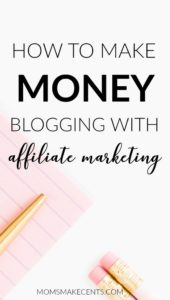
Online Course: Pinterest To Profits
If you are looking for a course to help you monetize your blog, this is a great one! McKinzie is the creator of Moms Make Cents so she has a lot of first-hand experience with monetizing your blog and has experienced much success from it! The course is only $37.00 and includes a TON of valuable information which will help any blogger start their affiliate marketing. The techniques and strategies are easy to understand, clear and smart. You will have access to the course forever if you purchase it so if you ever want to re-watch it, like I have, you can. Click here if you’re interested in this great course!
Free Stock Photos: Pixabay or Pexels
These sites I like to use for free stock photos but there are SO many sites out there! I like these because they have a good amount of free photos. I use some for my Pinterest board covers and some for basic graphics on my site.The photo at the top of this post is actually from Pixabay!
Email Service
Email: MailPoet
I know many people use MailChimp but I found it too be way too involved for starting off a blog. I did not need all of the bells and whistles it provided so I opted for MailPoet! It was much easier for me to use and is free! It allowed me to do the two main things I was looking to do. 1. Build an email subscriber list and 2. have new posts automatically send to that subscriber list! You also can send newsletters and other emails as you please. The templates are very easy to work with and keeping track of everything is done right inside your WordPress dashboard which I love. If you are fortunate to get thousands of subscribers, then you can and will want to upgrade to a larger plan but until then, why pay for it? Check out this video tutorial if your interested in finding out more!
Last Pass: Password Saver
This resource is so neat and I actually just discovered it last month so I wanted to share it! It allows you remember your passwords AND do so safely! All you do is add the browser button to your bookmark bar and whenever you create a new account or log into an account, it will auto-fill for you. This is AWESOME and saves me SO much time searching, guessing or often resetting my password!
WorkFlowy: Online Note Organizer
If you a paper and pencil type of person, this is not for you. BUT if you like keeping track of everything online and need digital copies of everything this IS for you! This note organizer is simply a way to type up notes/ideas that also allows you to quickly update and move these ideas around without erasing or crossing things out.
Okay that’s it! I hope this is enough to help get you started!
FYI* The only resources I chose to pay for later on in blogging (besides my domain and hosting) are Tailwind, PicMonkey and FoodBloggerPro. It is close to impossible to monetize your blog if you don’t invest a little up front.
Follow me!